Accelerate® is an AI-transcription meeting platform for client-facing professionals — capturing, summarizing, and structuring every conversation so the busywork happens after the call, automatically.
Project
Accelerate®
Timeline
2022
Team
Intuit VEP
Context
In 2022, under Intuit's Virtual Expert Platform, I led the design for Accelerate®. For Intuit's customer base of advisors, consultants, and business owners, the biggest time sink sits between scheduling, meeting, and information capture — synthesizing summaries and action items — compounded by the cognitive load of context-switching.
Accelerate® was conceived to eliminate that friction: automating scheduling and transcribing conversations into structured summaries and action items, so business owners could stay fully present with their clients while the platform handled capture in the background. I owned the end-to-end product design — business-owner onboarding, client-side mobile authentication, and the live meeting with its synced AI transcription.
The concept was later integrated across Intuit's product ecosystem rather than shipping standalone. Since then, products like Gong and Tactiq have built on the same premise — validating where the idea was headed.
This case study proves Accelerate® could stand on its own as a real, shippable product — and shows how I took it from design all the way to deployed code.
Strategy
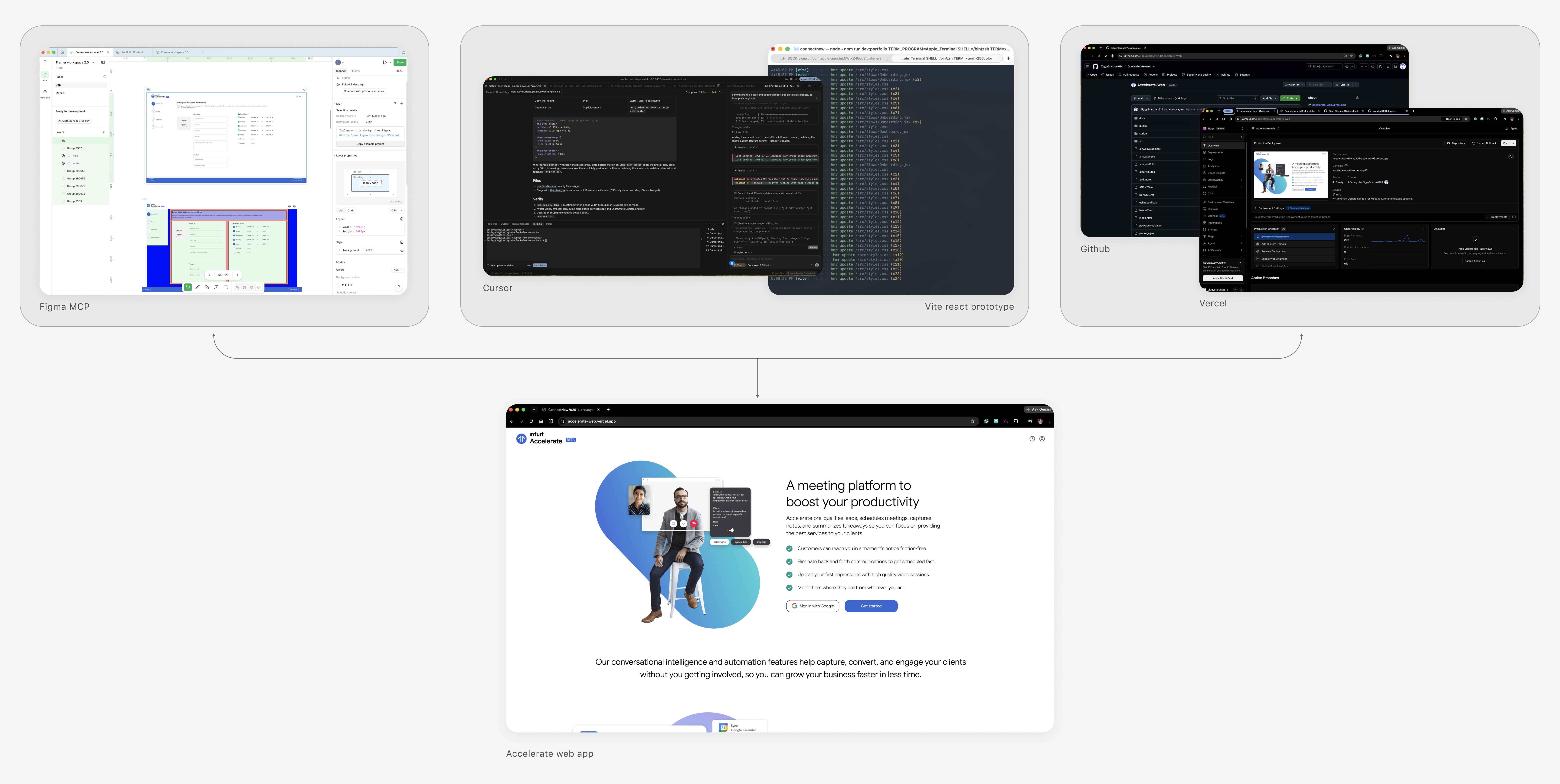
I rebuilt Accelerate as a responsive web app on an AI-native workflow that ran from canvas to deploy: Figma Dev Mode → Cursor (bridged by Figma MCP) → React + Vite → GitHub → Vercel. Figma stayed the source of truth — each screen was implemented from specific node references, pulling real spacing, hex values, and named vector assets rather than eyeballing screenshots. In Cursor, I worked in plan-then-review sessions, one screen per pass, with a durable AGENTS.md holding architecture, breakpoints, and a strict "no new dependencies" rule so the build stayed consistent and every change landed as a reviewable diff. I stayed in the design seat, approving each step.
The architecture is a series of deliberate calls. No UI framework — no MUI, Bootstrap, or Tailwind; I ported outlined fields, floating labels, checkboxes, and loaders as pure CSS against a 4dp token scale in :root. A lightweight state-machine router instead of react-router, since the flow is linear and the dependency would earn nothing. The transcript runs off a single source of truth — the video's own clock — so useVideoTranscript reveals transcript, summary, and action items against currentTime, staying deterministic for recorded demos. The public room uses real camera and mic via getUserMedia.
Responsive was a first-class deliverable, not a retrofit: one system reflowing across three breakpoints — desktop side-panel to tablet stacked to phone single-column — with container queries on the dashboard tiles, QA'd on real devices over LAN.
Outcome
The result ships: a ~4 MB public build deployed to https://accelerate-web.vercel.app/, with a dual-mode setup that keeps the site fast while preserving a full MP4-synced walkthrough locally — a feature flag lazy-loads the heavy demo only when needed. Onboarding, authentication, link generation, and a live meeting with synced AI notes, designed in Figma and built in deployed code.
More than a prototype, it shows how I work: carrying a design from concept to shipped product without losing intent in translation, using AI-native tooling to move fast while keeping every architectural decision my own.
Latest projects
Accelerate® is an AI-transcription meeting platform for client-facing professionals — capturing, summarizing, and structuring every conversation so the busywork happens after the call, automatically.
Project
Accelerate®
Timeline
2022
Team
Intuit VEP
Context
In 2022, under Intuit's Virtual Expert Platform, I led the design for Accelerate®. For Intuit's customer base of advisors, consultants, and business owners, the biggest time sink sits between scheduling, meeting, and information capture — synthesizing summaries and action items — compounded by the cognitive load of context-switching.
Accelerate® was conceived to eliminate that friction: automating scheduling and transcribing conversations into structured summaries and action items, so business owners could stay fully present with their clients while the platform handled capture in the background. I owned the end-to-end product design — business-owner onboarding, client-side mobile authentication, and the live meeting with its synced AI transcription.
The concept was later integrated across Intuit's product ecosystem rather than shipping standalone. Since then, products like Gong and Tactiq have built on the same premise — validating where the idea was headed.
This case study proves Accelerate® could stand on its own as a real, shippable product — and shows how I took it from design all the way to deployed code.
Strategy
I rebuilt Accelerate as a responsive web app on an AI-native workflow that ran from canvas to deploy: Figma Dev Mode → Cursor (bridged by Figma MCP) → React + Vite → GitHub → Vercel. Figma stayed the source of truth — each screen was implemented from specific node references, pulling real spacing, hex values, and named vector assets rather than eyeballing screenshots. In Cursor, I worked in plan-then-review sessions, one screen per pass, with a durable AGENTS.md holding architecture, breakpoints, and a strict "no new dependencies" rule so the build stayed consistent and every change landed as a reviewable diff. I stayed in the design seat, approving each step.
The architecture is a series of deliberate calls. No UI framework — no MUI, Bootstrap, or Tailwind; I ported outlined fields, floating labels, checkboxes, and loaders as pure CSS against a 4dp token scale in :root. A lightweight state-machine router instead of react-router, since the flow is linear and the dependency would earn nothing. The transcript runs off a single source of truth — the video's own clock — so useVideoTranscript reveals transcript, summary, and action items against currentTime, staying deterministic for recorded demos. The public room uses real camera and mic via getUserMedia.
Responsive was a first-class deliverable, not a retrofit: one system reflowing across three breakpoints — desktop side-panel to tablet stacked to phone single-column — with container queries on the dashboard tiles, QA'd on real devices over LAN.
Outcome
The result ships: a ~4 MB public build deployed to https://accelerate-web.vercel.app/, with a dual-mode setup that keeps the site fast while preserving a full MP4-synced walkthrough locally — a feature flag lazy-loads the heavy demo only when needed. Onboarding, authentication, link generation, and a live meeting with synced AI notes, designed in Figma and built in deployed code.
More than a prototype, it shows how I work: carrying a design from concept to shipped product without losing intent in translation, using AI-native tooling to move fast while keeping every architectural decision my own.